Thursday, September 4, 2025

Simulating Arithmetic Operations in SQL Server Using a Custom Function

In this blog post, I’ll walk you through a creative SQL Server script that simulates basic arithmetic operations (+, -, *, /) using loops and logic, rather than direct operators. This can be a fun exercise in understanding control flow and function design in T-SQL.

Friday, May 31, 2024

SQL Server Scenario Based Interview Question - 3

There is a database which contains below tables.

Product

Customer

1. Write a query which shows the count for each Products.

Select 

P.Name,
count(C.CID)
From 
@Product P
left join @Customer C on C.PID = P.PID
Group by
P.Name

2. Write a query which shows the Product which doesn't have any customer.

Select 
Name 
From 
@Product 
Where 
PID not in (select distinct PID from @Customer where PID is not null)


Thursday, July 23, 2015

Write recursive t-sql code to find NTILE / DECILE / Quintile based on Salary descending for employee in the Department.


Write a query which will give below output.


There’s a table with below data


Query:

Declare @v_Employee as table(DeptID int, EmpNo int, Salary decimal(18,2))

Declare @v_Ntile int

Set @v_Ntile = 2

Insert into @v_Employee values(1,1,1000)
Insert into @v_Employee values(1,2,2000
Insert into @v_Employee values(1,3,3000)
Insert into @v_Employee values(2,4,4000)
Insert into @v_Employee values(2,5,5000)
Insert into @v_Employee values(2,6,6000)
Insert into @v_Employee values(2,7,7000)

Select * From @v_Employee

Select 

    DeptID
    EmpNo
    Ntile(@v_Ntile) Over(Partition By DeptID Order By Salary  Desc)  NtileNo
From 

    @v_Employee

Note:

1) To find Decile value, set Ntile value to 10.
2) To find Quin-tile (Quintile) value, set Ntile value to 5.

Wednesday, July 22, 2015

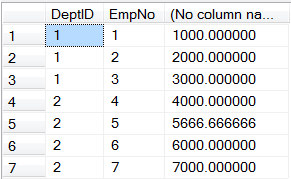
Write recursive t-sql code to fill missing Salary for employee using Average for the Department.

There’s a table with below data


Write a query which will give below output.


Query:

Declare
@v_Employee as table(DeptID int, EmpNo int, Salary decimal(18,2))

Insert into @v_Employee values(1,1,1000)
Insert into @v_Employee values(1,2,null)
Insert into @v_Employee values(1,3,3000)
Insert into @v_Employee values(2,4,4000)
Insert into @v_Employee values(2,5,null)
Insert into @v_Employee values(2,6,6000)
Insert into @v_Employee values(2,7,7000)

Select * From @v_Employee

Select


T.DeptID,

EmpNo,
Case when Salary is not null then Salary else AvgSalary end
From


(
 select
 DeptID,
 avg(Salary) as AvgSalary
 from
 @v_Employee
 Group By
 DeptID
) T
inner join @v_Employee E on E.DeptID = T.DeptID

Friday, March 13, 2015

Write recursive t-sql code to generate reverse of given string

Create Function [dbo].[fn_Reverse](@v_Input nvarchar(max))
Returns nvarchar(max)
as
Begin
If (len(@v_Input) <> 1)
Begin
return [dbo].[fn_Reverse](substring(@v_Input, 2, len(@v_Input) - 1)) + substring(@v_Input, 1, 1)
End
return @v_Input
End
GO

select [dbo].[fn_Reverse]('acbdkkdfkdkf')
Go

--> fkdkfdkkdbca

Write recursive t-sql code to get Factorial of integer number

Create Function dbo.fn_Factorial(@v_Number bigint)
Returns bigint
as
BeginIf (@v_Number != 1)
go
Select dbo.fn_Factorial(6)

Begin
return @v_Number * dbo.fn_Factorial(@v_Number - 1)
End
return 1
End
go

Saturday, February 7, 2015

Write T-SQL code to take m valid values from User and provide all valid Sudoku possibilities for nXn matrix

Continue to my last post “Write T-SQL code to provide all valid Sudoku possibilities for nXn matrix.

I modified the procedure sc.cp_Create_MetrixPosibilities_nXn which also take m valid values from User for matrix and create table dbo.MetrixPosibilities_nXn with all valid Sudoku possibilities.

Below are parameters for the procedure sc.cp_Create_MetrixPosibilities_nXn.

  1. @p_MatrixSize
    1. Size of matrix for which we want to create all the possibilities.
  2. @v_PositionMatrixValue
    1. Table Value Parameter which is used to pass valid user entries. Below is structure of TVP.
      1. PositionX
      2. PositionY
      3. Value

Suppose, we have 4X4 matrix with below values for which I want to create all valid possibilities

4X4 - Copy

We can execute procedure as below.

Declare @v_PositionMatrixValue as PositionMatrixValue

Insert into @v_PositionMatrixValue values(1,1,1)
Insert into @v_PositionMatrixValue values(2,2,2)
Insert into @v_PositionMatrixValue values(3,3,3)
Insert into @v_PositionMatrixValue values(4,4,4)

EXEC sc.cp_Create_MetrixPosibilities_nXn 4, @v_PositionMatrixValue, 0
Go

Select * From MetrixPosibilities_4X4

Here, we have 2 valid possibilities created as below in table dbo.MetrixPosibilities_4X4.

image

Below are the scripts to download.

1. sc.cp_Create_MetrixPosibilities_nXn_V2.sql

Tuesday, February 3, 2015

Write T-SQL code to provide all valid Sudoku possibilities for nXn matrix.

This post specially dedicated to Anjana Ramamoorthy from Microsoft.

Below is the procedure sc.cp_Create_MetrixPosibilities_nXn which will take matrix size as parameter and create the table dbo.MetrixPosibilities_nXn with all valid Sudoku possibilities.

Below are parameters for the procedure sc.cp_Create_MetrixPosibilities_nXn.

  1. @p_MatrixSize
    1. Size of matrix for which we want to create all the possibilities.

Suppose, we have 3X3 matrix for which I want to create all valid possibilities then we can execute procedure as below.

EXEC sc.cp_Create_MetrixPosibilities_nXn 3
Go
Select count(1) From dbo.MetrixPosibilities_3X3
--> 12

Here, we have 12 valid possibilities created as below in table dbo.MetrixPosibilities_3X3.

image

Below are the scripts to download.

1. sc.cp_Create_MetrixPosibilities_nXn.sql

Please keep watching for the second post.

Write T-SQL code to take m valid values from User and provide all valid Sudoku possibilities for nXn matrix

Tuesday, November 25, 2014

Write recursive t-sql code to get Square root of integer number without using SQRT function

Create Function [dbo].[fn_SQRT](@v_Number bigint,@v_ID bigint)
Returns bigint
as
Begin
If (@v_Number != 1)
Begin
if (@v_Number%@v_ID = 0)
Begin
Set @v_Number = @v_Number/(@v_ID * @v_ID)

return @v_ID * dbo.fn_SQRT(@v_Number, @v_ID)
End
Else
Begin
return dbo.fn_SQRT(@v_Number, @v_ID + 1)
End
End
return 1
End
GO

select [dbo].[fn_SQRT](63297936, 2)
Go

--> 7956

Monday, November 24, 2014

Write t-sql code to generate Fibonacci series without using any inbuilt function

Declare @v_Number INT = 158919851
Declare @v_First INT = 0
Declare @v_Second INT = 1
Declare @v_Temp INT

Print @v_First

While(@v_Second < @v_Number)
Begin
    Set @v_Temp = @v_First + @v_Second
    Set @v_First = @v_Second
    Set @v_Second = @v_Temp

    Print @v_First
End

Write t-sql code to check if given number is Palindrome or not without using any inbuilt function

Declare @v_ActualNumber INT = 158919851
Declare @v_ReverseNumber INT = 0
Declare @v_TempNumber INT
Declare @v_Number INT

Set @v_TempNumber = @v_ActualNumber

While(@v_TempNumber > 0)
Begin
    if (@v_TempNumber >= 10)
    Begin
        Set @v_Number = @v_TempNumber%10

        Set @v_ReverseNumber = @v_ReverseNumber + @v_Number

        Set @v_TempNumber = (@v_TempNumber - @v_Number)/10

        Set @v_ReverseNumber = @v_ReverseNumber * 10
    End
    Else
    Begin
        Set @v_ReverseNumber = @v_ReverseNumber + @v_TempNumber

        Set @v_TempNumber = 0
    End
End

if (@v_ActualNumber = @v_ReverseNumber)
Begin
    Print 'Palindrome Number'
End
Else
Begin
    Print 'Not Palindrome Number'
End

Write t-sql code to get Square root of integer number without using SQRT function

Declare @v_ActualNumber INT
Declare @v_FinalSquareRootNumber INT
Declare @v_SquareRootNumber INT
Declare @v_ID INT

Set @v_ActualNumber = 63297936
Set @v_FinalSquareRootNumber = 1
Set @v_ID = 2

While(@v_ActualNumber <> 1)
Begin
    if (@v_ActualNumber%@v_ID = 0)
    Begin
        Set @v_SquareRootNumber = @v_ID

        Set @v_ActualNumber = @v_ActualNumber/(@v_SquareRootNumber * @v_SquareRootNumber)

        Set @v_FinalSquareRootNumber = @v_FinalSquareRootNumber * @v_SquareRootNumber
    End
    Else
    Begin
        Set @v_ID = @v_ID + 1
    End
End

Select @v_FinalSquareRootNumber

Thursday, June 12, 2014

How to delete Team Project from Online Visual Studio

1) Login to online TFS account by accessing below link.
www.youracount.visualstudio.com
image
2) Click on Administer Account which is right side after your name.
image
3) It will show all team projects for your account. Click on “View the collection administration page”.
image
4) Right click the project which you want to delete and click on Delete.
image
5) It will ask for confirmation before deleting team project. Click on Delete Project.
image
6) Once the team project is delete. It will show status message for the team project is deleted.
image
Please free to comment if you have doubts or suggestion in this.

Wednesday, April 30, 2014

Could not update the metadata that indicates database is enabled for Change Data Capture.

Today, I came across below error when I was trying to enable CDC for database. I used below query to enable CDC on database.
Query:
Use Asif
Go

EXEC
sys.sp_cdc_enable_db
Go

Error:
Could not update the metadata that indicates database is enabled for Change Data Capture.

The failure occurred when executing the command 'SetCDCTracked(Value = 1)'. The error returned was 15404: 'Could not obtain information about Windows NT group/user , error code 0x5.'. Use the action and error to determine the cause of the failure and resubmit the request.

Fix:
I fixed it by changing database owner from my user to sa. Below is query to change db owner to sa.
Query:
Use Asif
Go

EXEC sp_changedbowner 'sa'
Go

Thursday, April 24, 2014

SQL Server Scenario Based Interview Question for Date

1.  How to get current month first date?
Query:
Declare @v_CurrentDate date = getdate()

-- Current DateSelect @v_CurrentDate
-- Current month first date
Select DATEADD(DD,1,EOMONTH(@v_CurrentDate,-1))

Select DATEADD(DD,-DAY(@v_CurrentDate) + 1,CAST(getdate() as date))

Output:
2014-04-01

2. How to get current month last date?
Query:
Declare @v_CurrentDate date = getdate()

-- Current Date
Select @v_CurrentDate

-- Current month last date
Select EOMONTH(@v_CurrentDate)

Select DATEADD(DD,-DAY(DATEADD(MM,1,@v_CurrentDate)),CAST(DATEADD(MM,1,@v_CurrentDate) as date))

Output:
2014-04-30

3. How to get next month first date?
Query:
Declare @v_CurrentDate date = getdate()

-- Current Date
Select @v_CurrentDate

-- Next month first date
Select DATEADD(DD,1,EOMONTH(@v_CurrentDate))

Select DATEADD(DD,-DAY(DATEADD(MM,1,@v_CurrentDate)) + 1,CAST(DATEADD(MM,1,@v_CurrentDate) as date))

Output:
2014-05-01

4. How to get next month last date?
Query:
Declare @v_CurrentDate date = getdate()

-- Current Date
Select @v_CurrentDate

-- Next month last date
Select EOMONTH(@v_CurrentDate,1)

Select DATEADD(DD,-DAY(DATEADD(MM,2,@v_CurrentDate)),CAST(DATEADD(MM,2,@v_CurrentDate) as date))

Output:
2014-05-31

Please feel free suggest if you have more question. We will include and also give credit for that.